The kleene CLI
Install, point it at a model, and run. Every command below is one binary,
kleene; run kleene --help or kleene <command> --help for the
flags as compiled.
- Install
- Set up a model provider (
kleene setup) - First run
- Global flags and files
- Commands:
run,resume,repl,explain,trace,tui,attach,daemon,learn,bench - Working from source
- Troubleshooting
Install
Prebuilt binaries for macOS (Apple silicon and Intel) and Linux (x86_64 and aarch64) are attached to every tagged release. Pick one of the three.
curl
curl -fsSL https://raw.githubusercontent.com/MarcusElwin/kleene/main/install.sh | shThe script detects your OS and architecture, downloads the latest release
tarball and its .sha256, verifies the checksum, and installs to
~/.local/bin (or /usr/local/bin when run as root). It tells you if the
destination is not on your PATH. Environment variables it honours:
| Variable | Effect | Default |
|---|---|---|
KLEENE_VERSION | Install a specific tag, e.g. v0.1.0 | latest release |
KLEENE_INSTALL | Destination directory | ~/.local/bin |
KLEENE_REPO | owner/repo to fetch from | MarcusElwin/kleene |
GITHUB_TOKEN (or GH_TOKEN) | Token with read access to the repository; required while it is private, and raises the API rate limit otherwise | unset |
Read it before piping it into a shell if that is your habit:
install.sh is a hundred lines of POSIX sh and needs only
curl and tar.
While the repository is private, the raw URL above returns 404, with or
without a token: raw.githubusercontent.com does not serve private files.
Fetch the script through the API’s contents endpoint instead, which returns
the file itself with the vnd.github.raw accept header. gh auth token
prints the token the GitHub CLI holds:
export GITHUB_TOKEN="$(gh auth token)"
curl -fsSL -H "Authorization: Bearer $GITHUB_TOKEN" -H "Accept: application/vnd.github.raw" \
  "https://api.github.com/repos/MarcusElwin/kleene/contents/install.sh?ref=main" | sh
or, letting gh handle the authentication:
export GITHUB_TOKEN="$(gh auth token)"
gh api -H "Accept: application/vnd.github.raw" repos/MarcusElwin/kleene/contents/install.sh | sh
The script downloads release assets through the GitHub API with the same token, which works for private and public repositories alike.
Until the first release exists there is nothing for the installer to
download and it says so. Publishing one is git tag v0.1.0 && git push origin v0.1.0. The workflow builds the four targets, attaches the tarballs and
checksums, and prints the values the Homebrew formula needs. Meanwhile,
build from a checkout: cargo install --path crates/kleene.
Homebrew
brew install MarcusElwin/kleene/kleeneThis installs from the tap MarcusElwin/homebrew-kleene, whose formula is
the template in Formula/kleene.rb. Homebrew
refuses a formula given by path (Homebrew requires formulae to be in a tap),
so until that tap exists, make a local one from a checkout:
brew tap-new marcuselwin/kleene
cp Formula/kleene.rb "$(brew --repository marcuselwin/kleene)/Formula/"
brew install --HEAD marcuselwin/kleene/kleene
--HEAD clones main and builds with cargo (about ten minutes, DuckDB
included), so it works before the first release and while the repository is
private, as long as git can authenticate to GitHub (gh auth setup-git, or
an SSH remote). Without --HEAD the formula downloads release binaries, which
needs a published release with its checksums pasted into the formula, and a
public repository.
cargo
cargo install --git https://github.com/MarcusElwin/kleene kleeneNeeds Rust 1.88 or newer and about ten minutes: DuckDB is compiled from source
on the first build. rustup picks the toolchain pinned in
rust-toolchain.toml automatically inside a checkout; cargo install --git
uses your default toolchain.
While the repository is private, cargo install --git over HTTPS fails with
failed to authenticate when downloading repository: cargo fetches with its
own git library, which does not consult your credential helper. Any of these
works instead:
cargo install --path crates/kleene                    # from a checkout you already have
CARGO_NET_GIT_FETCH_WITH_CLI=true \
  cargo install --git https://github.com/MarcusElwin/kleene kleene   # let the git CLI authenticate
cargo install --git ssh://git@github.com/MarcusElwin/kleene kleene   # over SSH
Check
kleene --version
kleene repl -c "SELECT 1 + 1 AS two"
The second line runs the relational core without a model and prints a
one-row table. If it prints two and 2, the engine works.
Configuring a model provider
Nothing that touches a model runs until one credential is set. Kleene speaks two wire formats directly, with no SDK and no gateway required.
kleene setup
The guided way. It asks which providers to use (a model provider, and
optionally the service behind the web_search tool), takes the keys with the
input masked, and writes them to the config file:
kleene setup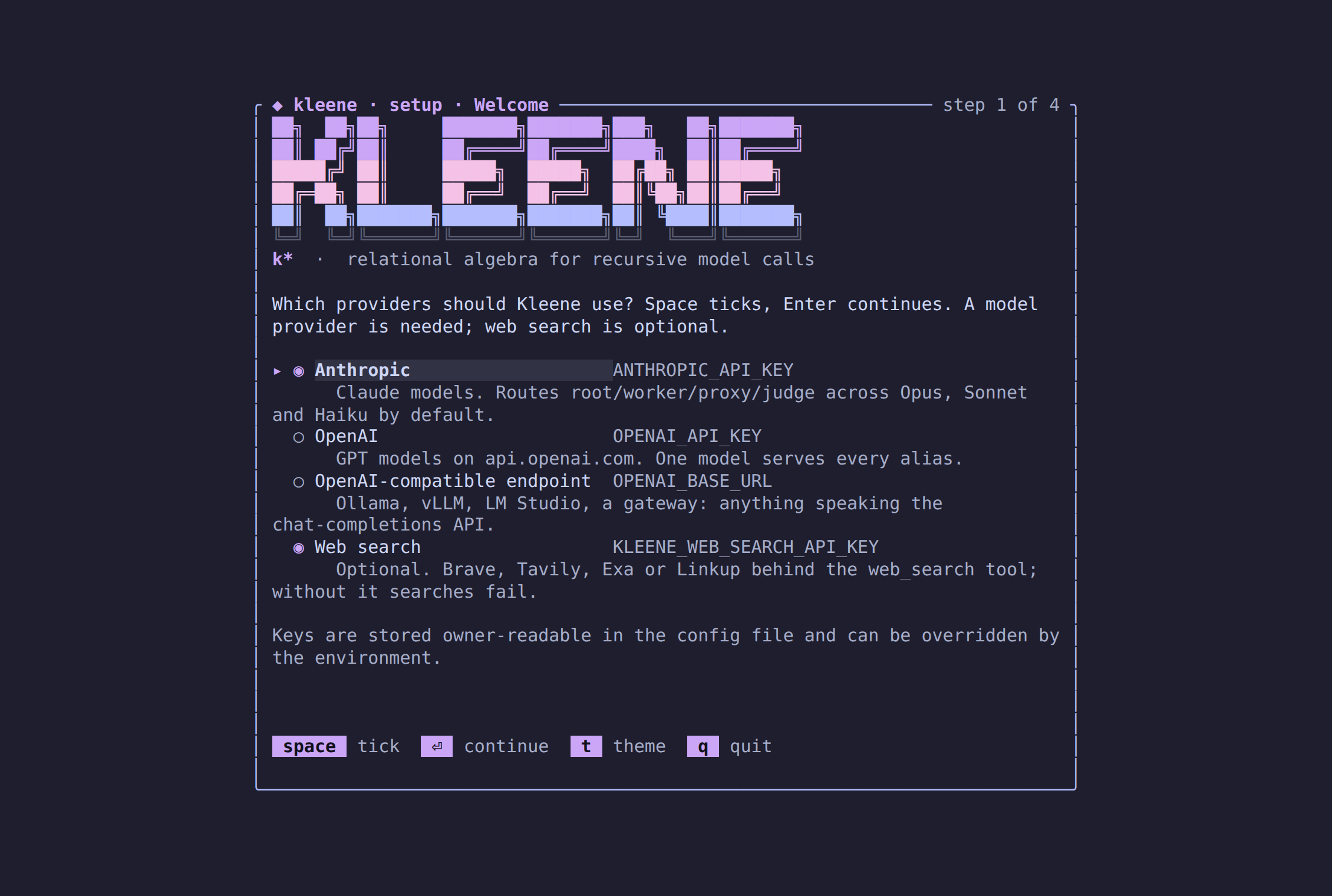
╭ ◆ kleene · setup · Welcome ─────────────────────── step 1 of 3 ╮
│ Which providers should Kleene use? Space ticks, Enter continues. │
│                                                                  │
│ ▸ ◉ Anthropic                    ANTHROPIC_API_KEY               │
│       Claude models. Routes root/worker/proxy/judge by default.  │
│   ○ OpenAI                       OPENAI_API_KEY                  │
│   ○ OpenAI-compatible endpoint   OPENAI_BASE_URL                 │
│       Ollama, vLLM, LM Studio, a gateway.                        │
│   ○ Web search                   KLEENE_WEB_SEARCH_API_KEY       │
│       Optional. Brave, Tavily, Exa or Linkup behind web_search.  │
╰──────────────────────────────────────────────────────────────────╯
kleene tui runs the same wizard on its own the first time it starts
without a configured provider, and /setup at the TUI’s prompt opens it
again at any time to add or change keys; saving there asks the running
daemon to reload, so the next run uses the new keys without a restart.
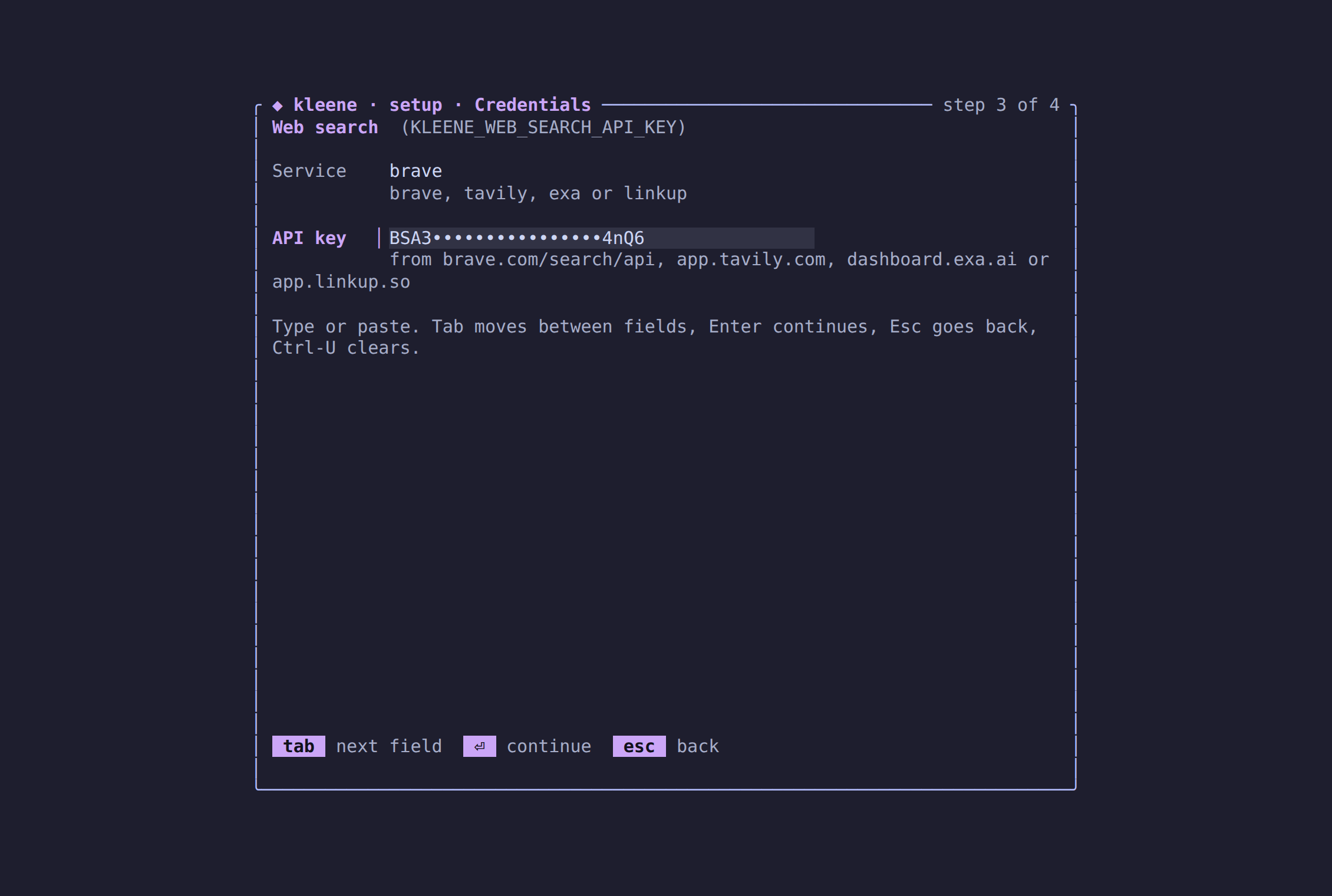
Web search is the fourth row of the first step: tick it with space, and
its own page asks for the service and the key.
 Non-interactive forms for scripts:
kleene setup --anthropic-key sk-ant-...
kleene setup --openai-base-url http://localhost:11434/v1 --openai-model llama3
kleene setup --router ~/.config/kleene/router.toml
kleene setup --web-search-provider brave --web-search-key BSA...   # or tavily, exa, linkup
kleene setup --show          # what is configured, keys masked, and from where
The file is config.toml in $KLEENE_CONFIG_DIR, else
$XDG_CONFIG_HOME/kleene, else ~/.config/kleene, written owner-readable
only:
[anthropic]
api_key = "sk-ant-..."

[openai_compat]
base_url = "http://localhost:11434/v1"
model = "llama3"

[web_search]
provider = "brave"      # or "tavily", "exa", "linkup"
api_key = "BSA..."
Environment variables always win over the file, field by field, so a
one-off ANTHROPIC_API_KEY=... kleene run keeps working and CI never needs
the file. A daemon that was already running before kleene setup keeps its
old keys until it is restarted or a TUI’s /setup asks it to reload.
Environment variables
Anthropic
export ANTHROPIC_API_KEY=sk-ant-...ANTHROPIC_AUTH_TOKEN is accepted instead of the key, and
ANTHROPIC_BASE_URL overrides the endpoint. With only Anthropic configured
the default routing is: root on Opus 5.5 at high effort, worker and judge
on Sonnet 5, proxy on Haiku 4.5 at low effort, prompt prefix cached
everywhere, priced from the first-party rate card.
OpenAI or any OpenAI-compatible endpoint
export OPENAI_API_KEY=sk-...
export OPENAI_MODEL=gpt-5.4-mini          # optional; the model every alias resolves to
A local server needs only a URL: OPENAI_BASE_URL=http://localhost:11434/v1
with no key. With only this configured, every alias resolves to
OPENAI_MODEL (default gpt-5.4-mini) and nothing is priced, so dollar
budgets and estimates read zero.
Both, or your own routing
Write a router file and point at it (kleene setup --router <path>, or the
environment):
export KLEENE_ROUTER_TOML=~/.config/kleene/router.toml[aliases.root]
candidates = [{ provider = "anthropic", model = "claude-opus-5-5" }]
options = { effort = "high", cache_prefix = true }
[aliases.worker]
candidates = [
{ provider = "anthropic", model = "claude-sonnet-5" },
{ provider = "openai_compat", model = "gpt-5.4-mini" }, # failover
]
options = { effort = "low" }
[aliases.proxy]
candidates = [{ provider = "anthropic", model = "claude-haiku-4-5" }]
[aliases.judge]
candidates = [{ provider = "anthropic", model = "claude-sonnet-5" }]
[pricing."claude-opus-5-5"]
input_per_mtok = 4.0
output_per_mtok = 20.0
cache_read_per_mtok = 0.4
cache_write_per_mtok = 5.0Web search
export KLEENE_WEB_SEARCH_API_KEY=BSA...
export KLEENE_WEB_SEARCH_PROVIDER=brave     # optional; brave (default), tavily, exa or linkup
The web_search(q [, n]) tool calls Brave Search (api.search.brave.com),
Tavily (api.tavily.com), Exa (api.exa.ai, with a short page text as the
snippet) or Linkup (api.linkup.so, standard depth) with this key and
returns rank, title, url, snippet, ten rows unless n says otherwise, at
most twenty. Without a key
every search fails with no web search backend configured.
Candidates are tried in order; one whose calls keep failing is skipped until
its circuit breaker cools down. options takes effort, cache_prefix,
temperature and provider-specific extra. Aliases are what SET model.default = 'worker', CREATE FUNCTION … MODEL 'proxy' and CREATE AGENT … MODEL 'worker' refer to; you can add your own names.
Every model call is memoised in the store by model and prompt fingerprint, so re-running a task, demo or benchmark against the same database costs nothing for prompts it has already seen.
First run
mkdir demo && cd demo
kleene setup                                # or: export ANTHROPIC_API_KEY=sk-ant-...

# A task over a context file. The model gets ctx(ordinal, text), one row per
# paragraph, and writes CallSQL until FINAL.
kleene run "Which project consumed the most hours in total?" \
  --context /path/to/kleene/demos/oolong/corpus.txt --budget-calls 60

# See what it cost and what it did.
kleene trace "SELECT depth, role, outcome, turns, calls, dollars FROM trace_sessions"
kleene trace "SELECT sql, rows, calls FROM trace_statements ORDER BY started_at"

# Watch the next one live.
kleene tui --run @task.txt --context corpus.txt
Everything lands in .kleene/run.duckdb in the current directory. Delete
the directory to start clean, or pass --db to use another file.
Global flags and files
| Flag | Meaning | Default |
|---|---|---|
--db <path> | DuckDB file holding session tables, memo, trace and learning state | .kleene/run.duckdb |
--workspace <dir> | Root the tools (files, grep, read, shell, write_file, …) are confined to | current directory |
--log <filter> | Log filter, e.g. info or kleene=debug | warn |
Files under the working directory:
| Path | What |
|---|---|
.kleene/run.duckdb | the store: your tables, memo, trace_*, kleene_sessions, learning and bench tables |
.kleene/daemon.sock | the daemon’s Unix socket (--socket on daemon, tui, attach) |
~/.config/kleene/config.toml | provider and web search keys written by kleene setup or /setup (KLEENE_CONFIG_DIR moves it) |
~/.config/kleene/mcp.json, .kleene/mcp.json | MCP servers, per user and per project (kleene mcp add, /mcp add); the project file wins on a name clash |
~/.config/kleene/skills/<name>/SKILL.md, .kleene/skills/<name>/SKILL.md | skills, per user and per project (also ~/.agents/skills, .agents/skills, .claude/skills); a project skill replaces a user or built-in one of the same name |
KLEENE.md, AGENTS.md or CLAUDE.md | project instructions at the workspace root, the first found, rendered into every session’s prompt |
.kleene/ is git-ignored in this repository; add it to yours.
Task arguments accept either literal text or @path to read a file.
Commands
kleene setup
Configure providers; see above. Interactive in a terminal, flag-driven otherwise.
| Flag | Meaning |
|---|---|
--anthropic-key <key> | Anthropic API key (an OAuth token works too) |
--anthropic-base-url <url> | Anthropic endpoint override |
--openai-key <key> | OpenAI or compatible API key |
--openai-base-url <url> | OpenAI-compatible endpoint; a local server needs only this |
--openai-model <model> | The model every alias resolves to without a router |
--router <path> | Router TOML with aliases, failover and pricing |
--web-search-provider <name> | Service behind the web_search tool: brave (default), tavily, exa or linkup |
--web-search-key <key> | API key for the web search service |
--show | Print the effective settings with keys masked and stop |
Flags merge into the existing file; providers not mentioned are kept.
kleene
With no arguments, in a terminal, kleene opens the terminal UI: a welcome
block, the prompt focused, slash commands one / away. Type a task, press
Enter, and watch the run. This is the same UI as kleene tui; see below.
Outside a terminal it prints the wordmark and the version.
kleene run <task>
Run a task to completion: the model writes CallSQL turn by turn until
FINAL. The reply streams to the terminal as the model writes it, with the
SQL highlighted and the prose dimmed; a spinner shows while the model thinks
and while its statements run, counting the model calls they make; each
statement’s rows print as a table, errors in red with the hint in yellow; and
the final relation prints as a box-drawn table sized to the terminal. When
stderr is not a terminal, colour and spinners switch off and the output is
plain. Child sessions (rlm, spawn) are summarised one level in, not
streamed.
kleene run <task|@file> [--context <file>] [--max-turns 30] [--max-depth 2]
[--budget-calls N] [--budget-dollars X] [--check <cmd>] [-q|--quiet]| Flag | Meaning |
|---|---|
--context <file> | Loaded as table ctx(ordinal, text), one row per blank-line-separated paragraph |
--max-turns | Turn cap for the root session (default 30); resume grants more |
--max-depth | Deepest child session allowed (default 2); 0 disables rlm and spawn |
--budget-calls, --budget-dollars | Budget for the whole run including children; a statement whose estimate exceeds what is left is refused with its plan |
--check <cmd> | A shell command run in the workspace whenever the root session writes FINAL; a non-zero exit refuses the FINAL, renders the output back and the session continues. Give a code task its test command (--check 'python3 -m unittest -q') and it cannot end red |
-q | Print only the final relation |
The run id is printed with the result and stored in trace_runs. The
session’s earlier turns are folded into its table turns(n, sql, result)
once more than sixteen have run (the last eight stay in the prompt in
full), a table named plan(step, status) is shown by the UI as the task’s
plan, and the skills and MCP tools below are in every session’s catalog.
kleene resume <run-id>
Continue a root session that stopped at its turn cap or was interrupted.
Transcript, defined functions, agents, settings and spend are restored from
kleene_sessions; turn numbering continues.
kleene resume <run-id> [--max-turns 30] [-q]
kleene trace "SELECT run, outcome, turns FROM trace_sessions WHERE depth = 0"
kleene repl
An interactive CallSQL REPL against the store. Reads statements from stdin,
one per line or terminated by ;, plans each just before running it, and
prints the rendered rows with a footer of calls, tokens and dollars when a
statement made calls.
kleene repl                                   # interactive
kleene repl -c "SELECT 1 + 1 AS two"          # one statement
kleene repl < demos/planner/three_way.sql     # a script
Everything in DIALECT.md works here: CREATE FUNCTION … AS PROMPT, CALL shell(...), SET budget.calls = 20, EXPLAIN, WITH RECURSIVE. Tables you create persist in the store, so the next repl or
run sees them.
kleene explain <sql>
Print the call plan for one statement without executing it: per operator the estimated rows, calls, tokens and dollars, call kinds, fences, the complexity fragment, the rules that fired, the join-order plan space and the priced alternatives. Needs no provider.
kleene explain "SELECT c FROM candidates WHERE llm_bool('Is ' || c || ' a real place?')"EXPLAIN ANALYZE <statement> inside repl also runs it and prints actuals.
kleene trace <sql>
Run DuckDB SQL directly over the store: the trace tables, the memo, the learning and bench tables, and your own session tables.
kleene trace "SELECT depth, role, outcome, turns, calls, dollars FROM trace_sessions ORDER BY started_at"
kleene trace "SELECT alias, model, memo_hit, cost_usd FROM trace_calls ORDER BY started_at DESC LIMIT 20"
kleene trace "SELECT tool, args, elapsed_ms FROM trace_tool_calls"
kleene trace "SELECT cte, round, delta_rows FROM trace_rounds"
Tables: trace_runs, trace_sessions, trace_statements, trace_calls,
trace_tool_calls, trace_rounds, trace_final, memo,
kleene_sessions, plus the learning tables (tasks, attempts,
playbook, playbook_evals, task_ratings, solver_ratings,
generator_state, view trace_tasks) and the bench tables (evals,
bench_runs). Your own session tables are here too.
kleene tui
Open the terminal UI over the engine daemon, starting one in the background
if nothing is listening on the socket. The first time, with no provider
configured, it runs the setup wizard before connecting. kleene alone does
the same.
kleene tui [--run <task|@file>] [--context <file>] [--socket <path>]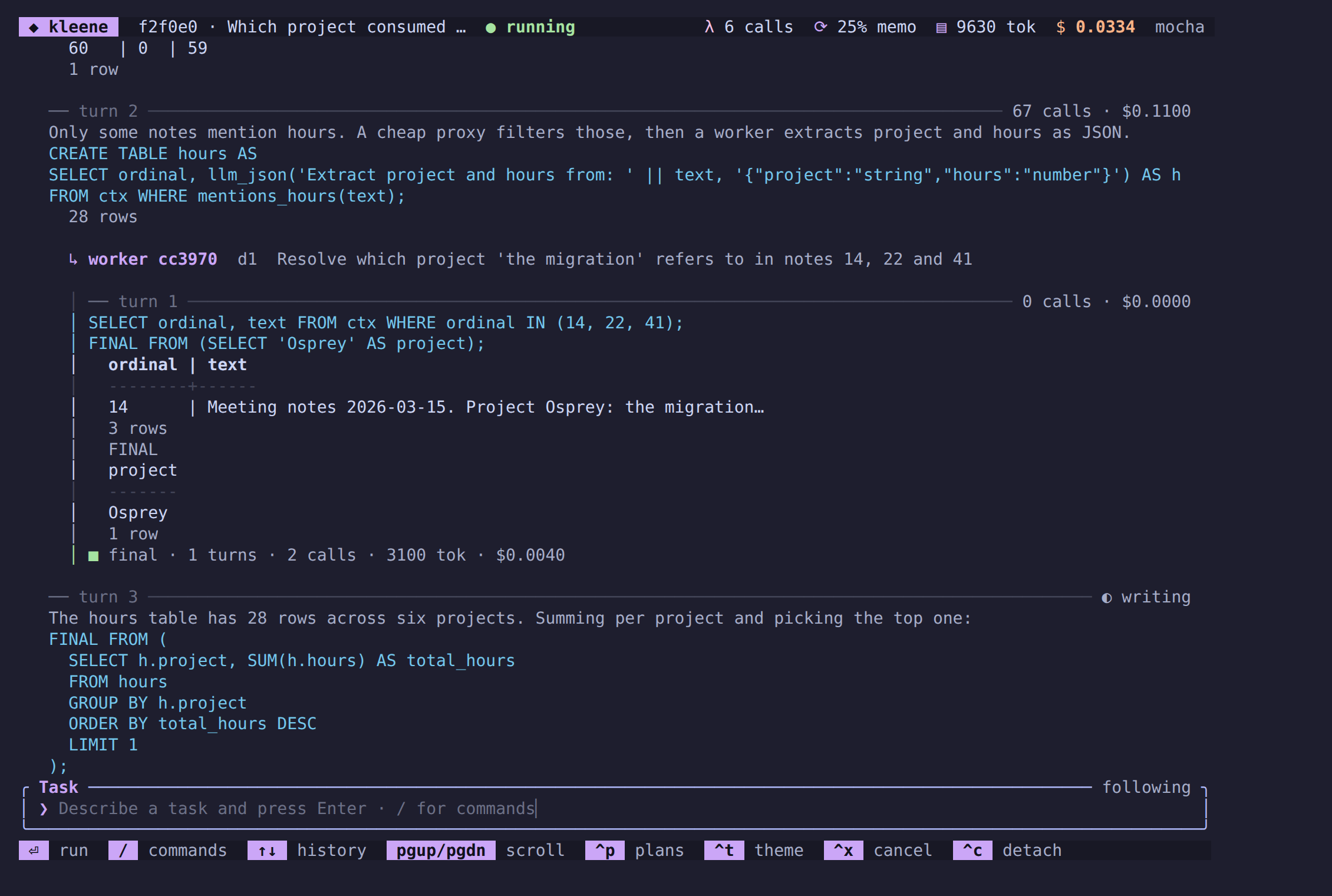
It is one scrolling stream, in the manner of prime-agent and opencode: a
header with the run, its status and the spend; the stream; a prompt that
always has focus; a footer of keys. A task typed at the prompt starts a run
on the daemon. The run appears in the stream as it happens: each turn under
a rule with its calls and cost, the model’s reply streaming in with the SQL
highlighted, every statement’s result, child sessions one level in, and the
answer as a FINAL block. Ctrl-P unfolds each statement’s EXPLAIN under
it. Runs started against the same daemon from another client (kleene tui --run, kleene attach --run) appear in the same stream; kleene run is
in-process and does not go through the daemon.
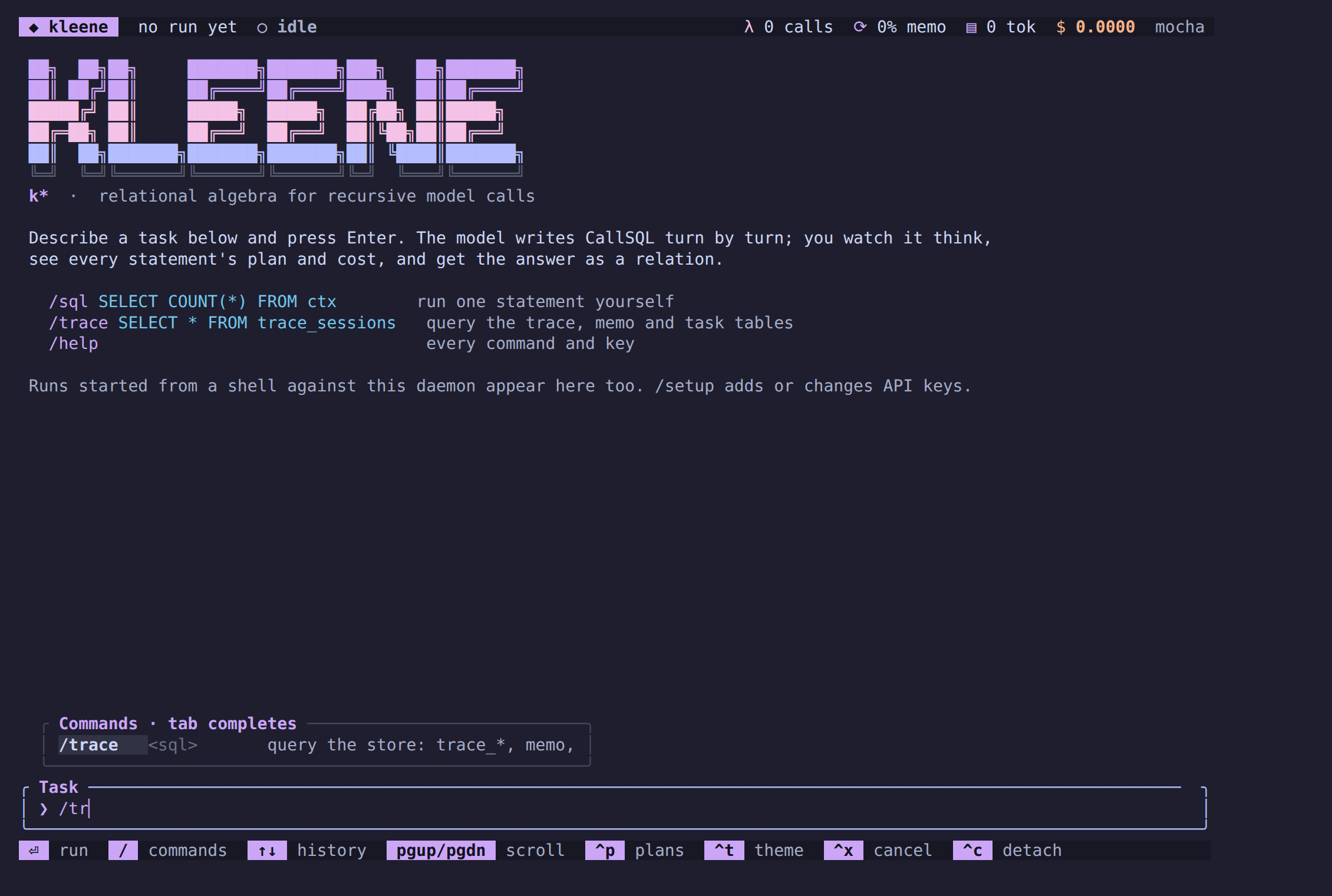
Slash commands, with completion (type /, Tab completes, ↑/↓ pick):
| Command | Does |
|---|---|
/help | the commands and keys |
/sql <statement> | run one CallSQL statement in an interactive session; the result prints inline |
/trace <sql> | query the store (trace_*, memo, tasks, evals, your tables) as a table |
/board | the continual loop’s task board |
/runs | live runs on this daemon |
/follow <run> | show a run by the tail of its id; new runs are followed on their own |
/cancel | cancel the run being followed |
/plans | show or hide EXPLAIN plans under statements |
/theme [flavour] | next Catppuccin flavour, or mocha, macchiato, frappé, latte |
/setup | the setup wizard over the stream: add or change model provider and web search keys; saving reloads the daemon |
/mcp | the configured MCP servers with their state and tools |
/mcp add <name> <command> [args...] | add a server to the user’s mcp.json and reload; /mcp remove <name> drops it |
/skills [name] | the loaded skills with their source and description, or one skill in full |
/clear | clear the stream |
/quit | detach; the daemon and its runs keep going |
A session that keeps a plan table shows it under its latest turn, one
line per step with ✓ done, ◐ doing and ○ todo.
Keys:
| Key | Action |
|---|---|
Enter | run the task, or the command |
Tab | complete the command |
↑ / ↓ | walk the input history, or move in the command popup |
PgUp / PgDn, Home / End | scroll the stream; End follows the newest output again |
Ctrl-P | show or hide plans |
Ctrl-T | next Catppuccin flavour; KLEENE_THEME=latte picks the starting one |
Ctrl-X | cancel the run being followed |
Ctrl-U | clear the input |
Esc | clear the input and close the command popup |
Ctrl-L | clear the stream |
Ctrl-C | detach; the daemon and its runs keep going |
kleene attach
Headless twin of tui: attaches to the daemon and prints every server
message as a JSON line. With --run, starts that task on connect and exits
when it finishes, so it can drive scripts and evaluations.
kleene attach --run "Sum 1..4" | jq -c 'select(.msg == "run_finished")'kleene daemon
Run the engine in the foreground on a Unix socket (--socket, default
.kleene/daemon.sock). Clients speak newline-delimited JSON: Subscribe
with a cursor for replay, StartRun, Submit (REPL statements in a
client-owned session), Query (SQL over the store), Cancel, CancelRun,
ListRuns, ListMcp, ListSkills, Reload (re-read the keys, mcp.json
and the skills; /setup and /mcp add send it after saving), Detach.
Two clients see the same event stream; a client that
reconnects resumes from its last cursor. See
ARCHITECTURE.md.
kleene mcp
Model Context Protocol servers. kleene mcp (or kleene mcp list)
connects every configured server and prints its state, its tools’ catalog
names and its command line. kleene mcp add <name> <command> [args...] [--env KEY=VALUE] [--project] writes the server to the user’s mcp.json
(the project’s .kleene/mcp.json with --project); kleene mcp remove <name> [--project] drops it. A server’s tools join every session’s catalog
as <name>_<tool>: read-only ones (readOnlyHint) are table functions
used in FROM, the rest run as CALL. The format of mcp.json is the one
every MCP client reads:
{ "mcpServers": { "fs": { "command": "npx", "args": ["-y", "@modelcontextprotocol/server-filesystem", "."] } } }A server that fails to start is reported and contributes no tools; nothing else changes. Only stdio servers are supported.
kleene skills
kleene skills lists every skill a session in this workspace can read:
the six built into the binary (code-task, create-skill,
run-benchmark, add-mcp-server, plan-queries, long-context), the
user’s and the project’s. kleene skills <name> prints one in full. A
skill is a directory with a SKILL.md (frontmatter name and
description, then Markdown); the prompt carries only the names and
descriptions, and the model reads a body with SELECT text FROM skill('name'). The create-skill skill explains how to write one.
kleene learn
The continual loop: generated and user tasks with code oracles, ratings, a curriculum, and a playbook of winning SQL adopted only after a replay eval. State lives in the store, so every command resumes where the last stopped.
| Command | What it does |
|---|---|
learn run [--tasks 10] [--budget-dollars X] [--minutes M] [--generators a,b] [--queue 3] [--replay 3] | Run unattended until a limit: keep --queue pending tasks per generator, pick the task nearest even odds, attempt it, judge, update ratings and dials, gate playbook candidates over --replay recent tasks (0 adopts outright) |
| `learn add <task | @file> [—kind user] [—context |
learn generate <generator> [--count 3] | Generate tasks at the generator’s current dial: sat3, graph, puzzle, corpus, repo, statements, contracts |
learn propose <topic> | Ask the model for a task, rubric and reference; a separate judge call grades attempts |
learn step [<task-id>] | Attempt one task now, by id or the curriculum’s pick |
learn board | Counts per generator and status, and each dial |
learn report | Solve rate, calls and depth by generator and difficulty (trace_tasks) |
learn playbook | The version ledger with eval notes and wins/tries |
learn revert <version> [--function] | Withdraw a playbook version, or with --function a learned function version (the previous version of that name is adopted again) |
learn functions | The learned function ledger: every version, whether it is adopted, and the replay note |
learn add-function '<CREATE FUNCTION ...>' | Put a prompt-defined function in the ledger as the adopted baseline of its name; solved runs seed the ledger with the functions they defined |
learn refine <name> [--kind k] | Ask the model for a better prompt from the adopted definition and recent failed attempts, then replay --replay tasks with and without it; adopted only when it solves at least as many at no more cost. Every session defines the adopted versions before its first turn |
kleene learn run --tasks 50 --budget-dollars 5 --generators puzzle,corpus,graph   # overnight
kleene learn report                                                                 # the morning query
kleene bench
Benchmarks over task packs (tasks/<pack>/pack.json) in one of three modes,
every task in a fresh workspace, every result a row in evals. What the
modes, oracles, report columns and plots measure is in
docs/BENCHMARKS.md.
| Command | What it does |
|---|---|
bench run <pack-dir> [--mode learning|frozen|plain] [--limit N] [--sample N --seed S] [--outputs <dir>] [--record <dir>] [--replay <dir>] [--resume <run-id>] | Run a pack. learning shows and adopts the playbook; frozen is the control; plain is a tool-calling agent on the same provider, tools and budget. --sample runs a seeded sample of N tasks in pack order; --outputs exports every task’s output/ in the layout Harvey LAB’s evaluator reads and prints the run_eval commands; --record saves every model reply as fixtures; --replay serves them offline. A task that ends without a token spent (no credit, a bad key) stops the run with the reason in bench_runs.note; --resume continues that run at the first task without a row |
bench build <out-dir> --from <generator> [--count 20] [--dial 0.5] [--seed 1] [--lazy] | Freeze generator output into a pack; same seeds, same tasks. --lazy stores generator references and regenerates on load. Generators: sat3, graph, puzzle, corpus, repo, statements, contracts, logbook, memo |
bench terminal <out-dir> | Write the built-in Terminal-Bench-style pack |
bench import-lab <checkout>/tasks <out-dir> [--sample N --seed S] | Import a Harvey LAB checkout (or one practice area under it) into a pack with the shipped rubrics; --sample imports a seeded sample and copies only its documents |
bench import-oolong <out-dir> [--dataset trec_coarse] [--context-len 131072] [--limit 50] [--offset 0] [--split validation|test] [--from-json <file>] | Import OOLONG-synth questions from Hugging Face into a pack with the oolong oracle; the defaults are the RLM paper’s trec_coarse 128k split |
bench import-redlining <out-dir> [--dataset 1k|10k|<repo>] [--split test|train] [--limit 100] [--offset 0] [--from-json <file>] | Import UmaiTech’s contract redlining examples (synthetic redlines over CUAD, CC BY 4.0) from Hugging Face into a pack with the redline oracle; the default is the 1k set’s held-out test split |
bench report | Accuracy, calls and dollars per pack and mode |
bench curve <run-id> [--window 5] | The learning curve of one run as a sparkline and rolling mean |
bench csv | Every eval row as CSV on stdout |
bench plot <out-dir> | The write-up’s plots as SVG files: learning_curve, cost_parity, calls_vs_difficulty, estimate_accuracy (the planner’s estimated calls against actuals, from trace_statements) and plan_space (join orders against relations joined) |
bench results <evals.csv>... [--out plots/results] [--readme README.md] [--plot <pack>]... | Results from several models side by side: reads bench csv files (every row names its model), writes results.md (one row per pack, mode and model with pass rate, $/task, calls, tokens and seconds as columns; a model not run on a pack and mode keeps a blank row) and one pass-rate-against-cost Pareto SVG per pack; --plot limits which packs’ plots the Markdown shows (default all); --readme replaces the block between <!-- bench-results:begin --> and <!-- bench-results:end --> in that document |
kleene bench import-oolong tasks/oolong-trec && kleene bench run tasks/oolong-trec --mode frozen
kleene bench import-redlining tasks/redlining-1k && kleene bench run tasks/redlining-1k --mode plain
kleene bench run tasks/oolong-like --mode frozen --record fixtures/oolong
kleene bench run tasks/oolong-like --mode learning --replay fixtures/oolong
kleene bench run tasks/terminal --mode plain
kleene bench report && kleene bench csv > evals.csv
kleene bench results plots/evals.csv plots/haiku-2026-10-01/evals.csv --readme README.md \
  --plot coding --plot memo-rubric --plot logbook-hard
Shipped packs are described in tasks/README.md.
Working from source
git clone https://github.com/MarcusElwin/kleene && cd kleene
cargo build --release                       # first build compiles DuckDB: ~10 min, ~4 GB
./target/release/kleene --help
cargo run -- repl -c "SELECT 42 AS answer"   # debug build, same engine
The checks CI runs, in the shape that reuses the DuckDB build:
cargo fmt --all -- --check
cargo clippy --workspace --all-targets --all-features -- -D warnings
cargo test --workspace --all-features
RUSTDOCFLAGS="-D warnings" cargo doc --workspace --no-deps
CLAUDE.md explains why the flags are shaped that way and how to keep
target/ from filling the disk. Releases are built by the workflow in
ci/release.yml on v* tags (four targets, tarballs with SHA-256 files,
formula values printed in the job log).
Troubleshooting
no model provider configured — run kleene setup, or set
ANTHROPIC_API_KEY, ANTHROPIC_AUTH_TOKEN, OPENAI_API_KEY or
OPENAI_BASE_URL. repl, explain and trace work without one as long as
the statement makes no calls. kleene setup --show says what is configured
and whether it came from the file or the environment.
Estimates and dollars are all zero — the model is not in the pricing
table. Only the Anthropic defaults come priced; add a [pricing."model"]
section to your router TOML.
A statement is refused with its plan — the estimate exceeded the
remaining call or dollar budget. Raise --budget-*, or narrow the query;
EXPLAIN shows where the calls go.
The TUI shows nothing — a stale socket from a killed daemon. Remove
.kleene/daemon.sock or pass a fresh --socket.
A ctx table already exists — an older run left one in this database.
Current versions replace it per run; on an old file, kleene trace "DROP TABLE ctx".
Building takes forever or fills the disk — that is DuckDB compiling from
source, once per build profile. Keep target/ between runs, and see
CLAUDE.md before deleting anything under it.